NotifyXR — Release Date, Trailer & What We Know
NotifyXR is a SteamVR overlay application designed to capture desktop notifications and display them inside your VR headset. Releasing Jul 7, 2026.
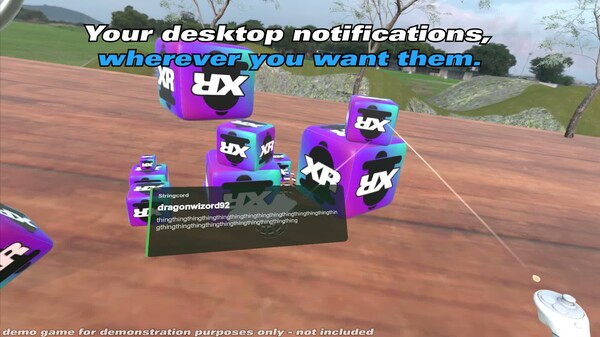
Official trailer & screenshots via Steam
About NotifyXR
-- Please Read Before Purchasing! -- > NotifyXR can only capture desktop notifications on Windows 10 version 1607 or newer, Windows 11, and Linux. Please do not buy if you're using Windows 7, 8, or 8.1! > NotifyXR can only capture incoming notifications if you have them enabled in your operating system and source app of choice! -- Oculus Users! -- > For NotifyXR to display ontop of your games, you must run them through SteamVR, which for some oculus store exclusives may mean changing launch options or using third party tools to run them through SteamVR. More info at the NotifyXR help center. OVERVIEW NotifyXR is a SteamVR Overlay application designed to capture desktop notifications and display them inside your VR headset. It automagically captures incoming notifications on your PC, and presents them to you for immediate viewing inside of your VR headset, so you don't miss out on any important updates. NotifyXR works out of the box, but has a wide array of configuration options to change the placement, appearance, movement, size of notifications, and more. NotifyXR works with any SteamVR compatible headset, and lets you adjust notification placement offsets to account for any fov-related issues. FEATURES Desktop Notifications NotifyXR automagically captures incoming desktop/toast notifications from any app on your PC. Keep up with messages from your friends, avoid missing a coming delivery, stay reminded of that upcoming calendar event NotifyXR keeps you updated in-game, so you don't have to tab out to your desktop just to see what's up. Presentation Modes NotifyXR comes with four presentation modes, letting you keep notifications as up-front or out-of-the-way as you want. Headset HUD mode places notifications right in front of you, anchored to your headset, with options to keep them at bottom, left, right, or top of your view. Left Wrist and Right Wrist modes place notifications anchored to your controllers, so you can look at them like a wristwatch. World Space mode places notifications in your playspace around you, keeping them out of the way for you to look at when you wish. Has options to place notifications in any direction around you. All modes support offsets, so you can have your notifications wherever you wish, and account for any headset-related fov disparities. Customization NotifyXR allows you to customize the look, feel, sound, and movement of your notifications. Change the accent colour, background colour, and transparency of notifications. Compact mode for smaller notification footprint. Fast animation mode. Support for custom notification sounds in WAV format. There's an API! NotifyXR comes with a local API, opt in, that allows external applications to send notifications to NotifyXR directly. This means developers can build apps or or plugins that send custom notification content directly to NotifyXR, with richer functionality than basic operating system notifications.
Description via Steam.
Key Stats
Should You Play NotifyXR?
-- Please Read Before Purchasing! -- > NotifyXR can only capture desktop notifications on Windows 10 version 1607 or newer, Windows 11, and Linux. Please do not buy if you're using Windows 7, 8, or 8.1! > NotifyXR can only capture incoming notifications if you have them enabled in your operating system and source app of choice! -- Oculus Users! -- > For NotifyXR to display ontop of your games, you must run them through SteamVR, which for some oculus store exclusives may mean changing launch options or using third party tools to run them thr…
NotifyXR is single-player on Steam and runs on Windows, Linux. It's on our trending radar ahead of its Jul 7, 2026 release.
Wishlisting notifies you at launch and helps the developer's visibility.
System Requirements & Platforms
View PC requirements & supported platforms
Platforms: Windows, Linux
Minimum
Requires a 64-bit processor and operating system · OS: Windows 10 version 1607 or later, x64 · Processor: Anything that runs SteamVR · Memory: 4 GB RAM · Graphics: Anything that runs SteamVR · Storage: 250 MB available space · VR Support: Any SteamVR compatible headset.
Recommended
Requires a 64-bit processor and operating system · OS: Windows 11, x64 · Processor: Intel Core i5-7400 or equivalent · Memory: 4 GB RAM · Graphics: Nvidia GeForce GTX 1060 or equivalent · Storage: 250 MB available space · VR Support: Any SteamVR compatible headset.
NotifyXR — Frequently Asked Questions
- When does NotifyXR release?
- NotifyXR is set to launch on Jul 7, 2026 (Coming Soon on Steam).
- What kind of game is NotifyXR?
- NotifyXR is a Sim game. NotifyXR is a SteamVR overlay application designed to capture desktop notifications and display them inside your VR headset.
- Is NotifyXR multiplayer or co-op?
- No — NotifyXR is listed as single-player only on Steam.
- Is NotifyXR on Steam Deck or consoles?
- NotifyXR runs on Windows, Linux via Steam; native Linux support makes it a strong Steam Deck candidate. No console release has been confirmed.
- How much does NotifyXR cost?
- Pricing has not been announced yet (N/A). Wishlist it on Steam to be notified at launch.
- What are NotifyXR's system requirements?
- The developer has not published detailed system requirements yet.
- Is NotifyXR worth wishlisting?
- If you enjoy Sim games like Tiny Glade, THE LIFT: Supernatural Handyman Simulator, Fields of Mistria, yes. It's on our trending radar.
- Who made NotifyXR?
- NotifyXR is developed by MachCoyote.
- What games is NotifyXR similar to?
- NotifyXR sits alongside Sim games such as Tiny Glade, THE LIFT: Supernatural Handyman Simulator, Fields of Mistria.
- What platforms is NotifyXR on?
- NotifyXR is available on Windows, Linux.
Data & media via Steam · updated 2026-07-17 · all trending games →